Powered by Blogger.

Followers

Thursday, 17 November 2016

Android Openfire Admin configuration

Posted by Sanjeet A On 12:05 No comments
I received few emails from the app users regarding the inconvenience of the configuration, Here is step - by - step instruction to configure it .

Step : 1
Login to your Openfire Administration Console on web.

Step : 2
Go to your plugins tab.

Step : 3
If you have already installed the Rest API plugin then go to step -4 else install the REST API plugin from the available plugins list.

Step : 4
Go to Server tab and choose the Server settings

Step : 5
Select the REST API from the left panel.

Step : 6
Enable the REST API Plugin  and choose the Authentication type.
if you choose "HTTP basic Auth" you will need the same credentials you use to login on the web console, alternatively you can choose the "Secrete key auth" where you need to note the provided secrete key or you can put your own.

Step : 7
Open Android App and enter the credentials bases upon step 6 and thats it.

You can see the everything now!
You can send me direct mail if you still facing the issue. Suggestion are also welcome :)
Thanks for reading!

Sunday, 9 October 2016

This question tells all the story about Android Studio 's Logcat!
If you are an Android Developer , you must have seen the (?) mark on other app's logs in the logcat.
However you can see the complete package names of the app which you have debugged.

Here is a way to find the other app's package name. But its not possible alone with the Android Studio. You need to install few tools for the same. You need following to external tools -

  1. York Logcat Android Studio Plugin
  2. York Logcat Android App.

You can browse your Android Studio's plugin repository and search for the york logcat plugin  or you can directly download and install it to your IDE.


Once you install the plugin you will see a red android logo tool logo on the right side of all icons in toolbar. If you have not connected the debugging this logo will be deam.

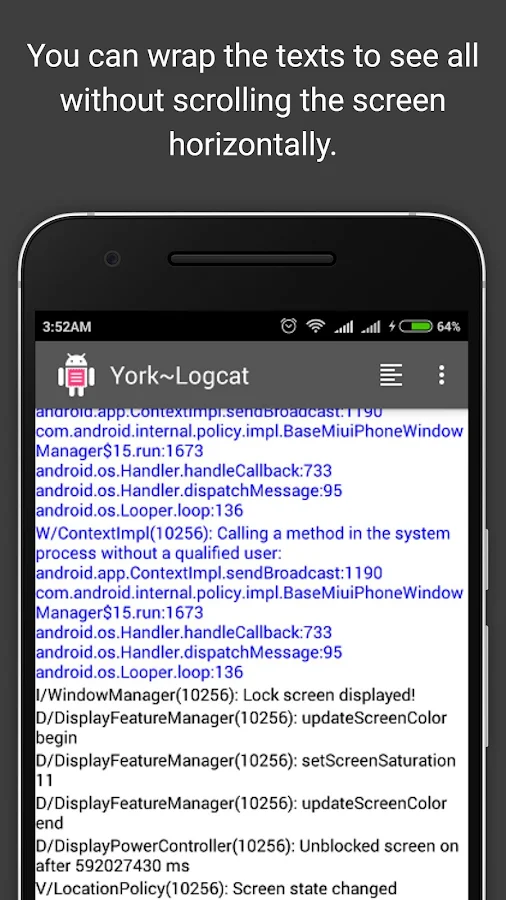
York Logcat android apps log screen -


Now connect app through adb and click the plugins start button, You
will see all the logs of your system.

Once you click on log tag you can see the package details in the snackbar -

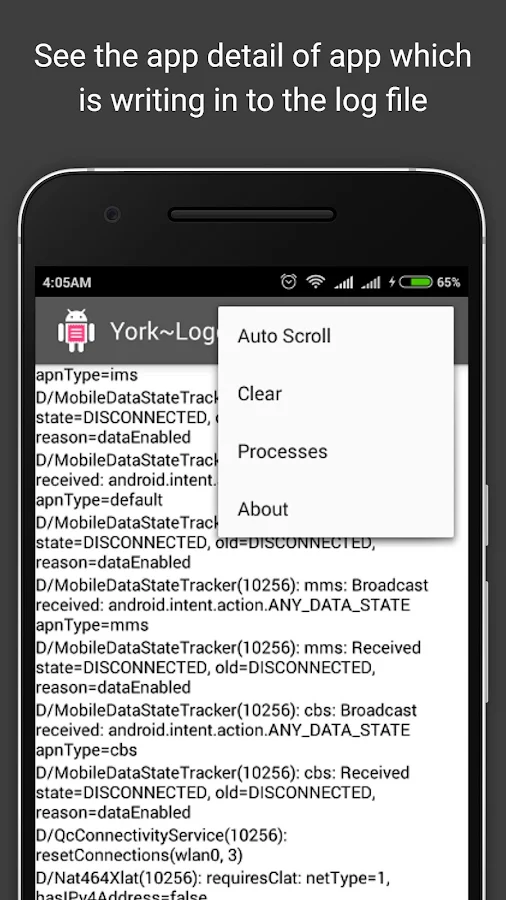
You can explore other feature available in the app, Here is the available options -

Thanks for reading this post!

Saturday, 8 October 2016

Java try-catch-finally return cases

Posted by Sanjeet A On 09:20 1 comment
Lets begin this post by asking the output of the following program.

public class Main {
    public static void main(String[] args) {
        System.out.println("It's number " + new Main().complexBehaviour());
    }

    private int complexBehaviour() {
        try {
            System.out.println("in try block");
            return new Integer("o1");
        } catch (Exception e) {
            System.out.println("in catch block");
            return new Integer("02");
        } finally {
            System.out.println("in finally block");
            return new Integer("03");
        }
    }
}

This question is asked a lot in interviews . Even I was asked twice the same question in
two different interviews.
Why interviewers asks this question - they want to understands that whether the candidate really understands the flow of try-catch-finally block or not.
As in most of the case candidate knows that finally block executes in all case. But she/he starts getting confused when interviewer combine it with return statements.

Lets first have a look on the oracle's exception tutorial. Here is what oracle says about the finally block

The finally block always executes when the try block exits. This ensures that the finally block is executed even if an unexpected exception occurs. But finally is useful for more than just exception handling — it allows the programmer to avoid having cleanup code accidentally bypassed by a returncontinue, or break. Putting cleanup code in a finally block is always a good practice, even when no exceptions are anticipated.

So now it is clear that whatever happens in the try or catch blocks finally will must be executing.
And here is the output of the code I started with.

in try block
in catch block
in finally block
It's number 3


Lets make a bit modification in the above code so it can look like this -

public class Main {
    public static void main(String[] args) {
        System.out.println("It's number " + new Main().complexBehaviour());
    }

    private int complexBehaviour() {
        try {
            System.out.println("in try block");
            return new Integer("o1");
        } catch (Exception e) {
            System.out.println("in catch block");
            System.exit(0);//Terminates the process        } finally {
            System.out.println("in finally block");
            return new Integer("03");
        }
    }
}

We have made a small change and used the System.exit(0) in the catch block.
Here is specific cases from the oracle docs which states when a finally block not executed.


Note: If the JVM exits while the try or catch code is being executed, then the finally block may not execute. Likewise, if the thread executing the try or catch code is interrupted or killed, the finally block may not execute even though the application as a whole continues.


And hence here is the output of the above program -

in try block
in catch block


Thanks for reading this post:)

Sunday, 14 July 2013

PHP files

Config file
<?php
define('DB_USER', "root");
define('DB_PASSWORD', "");
define('DB_DATABASE', "elec_bill");
define('DB_SERVER', "localhost");
?>


Connection class file


<?php
class DB_CONNECT {
    function __construct() {
        $this->connect();
    }
    function __destruct() {
        $this->close();
    }
    function connect() {
        require_once __DIR__ . '/db_config.php';
        $con = mysql_connect(DB_SERVER, DB_USER, DB_PASSWORD) or die(mysql_error());
        $db = mysql_select_db(DB_DATABASE) or die(mysql_error()) or die(mysql_error());
        return $con;
    }
    function close() {
        mysql_close();
    }
}
?>


bridging file


<?php
$response = array();

if(isset($_POST['user_id'])&&($_POST['connect']=="connectionallowed")){
require_once __DIR__ . '/db_connect.php';
$assignto=$_POST['user_id'];
$db = new DB_CONNECT();
$result = mysql_query("SELECT * FROM ebill_details WHERE eb_mtr_sl_no='$assignto'") or die(mysql_error());
if (mysql_num_rows($result) > 0) {
    $response["consumers"] = array();
    while ($row = mysql_fetch_array($result)) {
        $customerlist = array();
        $customerlist["cons_ac_no"] = $row["eb_cons_ac_no"];
$customerlist["cust_id"]=$row["eb_cust_id"];
$customerlist["oa_no"]=$row["eb_oa_no"];
$customerlist["inst_no"]=$row["eb_inst_no"];
$customerlist["mtr_sl_no"]=$row["eb_mtr_sl_no"];
$customerlist["mtr_owner"]=$row["eb_mtr_owner"];
$customerlist["cons_name"]=$row["eb_cons_name"];
$customerlist["cons_addrs"]=$row["eb_cons_addrs"];
$customerlist["bill_unit_1"]=$row["eb_bill_unit_1"];
$customerlist["prev_unit"]=$row["eb_prev_unit"];
$customerlist["prev_amt"]=$row["eb_prev_amt"];
$customerlist["pre_mtr_rdng"]=$row["eb_pre_mtr_rdng"];
$customerlist["tax"]=$row["eb_tax"];
$customerlist["bill_unit_2"]=$row["eb_bill_unit_2"];
$customerlist["bill_unit_3"]=$row["eb_bill_unit_3"];
$customerlist["bill_basis"]=$row["eb_bill_basis"];
$customerlist["energy_charge"]=$row["eb_energy_charge"];
$customerlist["ed_charge"]=$row["eb_ed_charge"];
$customerlist["mtr_rent"]=$row["eb_mtr_rent"];
$customerlist["misc_charge"]=$row["eb_misc_charge"];
$customerlist["prev_bill_dt"]=$row["eb_prev_bill_dt"];

        array_push($response["consumers"], $customerlist);
    }
    $response["success"] = 1;
    echo json_encode($response);
} else {
    $response["success"] = 0;
    $response["message"] = "No user found";
    echo json_encode($response);
}
}else {
    $response["success"] = 0;
    $response["message"] = "Required field missing";
    echo json_encode($response);
}

?>
Xml Files
<LinearLayout xmlns:android="http://schemas.android.com/apk/res/android"
    xmlns:tools="http://schemas.android.com/tools"
    android:layout_width="match_parent"
    android:layout_height="match_parent"
   
    android:orientation="vertical"
    tools:context=".BillDisplay" >

    <LinearLayout
        android:orientation="vertical"
        android:layout_width="match_parent"
        android:layout_height="wrap_content"
        android:background="#011023">

        <TextView
            android:layout_width="match_parent"
            android:layout_height="wrap_content"
            android:gravity="center"
            android:text="CESU" />

        <TextView
            android:layout_width="match_parent"
            android:layout_height="wrap_content"
            android:gravity="center"
            android:text="ELECTRICITY BILL" />

        <TableLayout
            android:layout_width="match_parent"
            android:layout_height="wrap_content" >

            <TableRow
                android:layout_width="match_parent"
                android:layout_height="wrap_content"
                android:weightSum="1" >

                <Button
                    android:id="@+id/bSave"
                    android:layout_width="0dp"
                    android:layout_height="wrap_content"
                    android:layout_weight="0.5"
                    android:text="Save As Text" />

                <Button
                    android:id="@+id/bPrint"
                    android:layout_width="0dp"
                    android:layout_height="wrap_content"
                    android:layout_weight="0.5"
                    android:text="Print" />
            </TableRow>
        </TableLayout>
    </LinearLayout>

    <ScrollView
        android:layout_width="match_parent"
        android:layout_height="wrap_content" >

        <LinearLayout
            android:layout_width="match_parent"
            android:layout_height="match_parent"
            android:orientation="vertical" >

            <TextView
                android:id="@+id/tvBill"
                android:layout_width="match_parent"
                android:layout_height="match_parent"
                android:gravity="left" />

            <TextView
                android:id="@+id/tvHeaderConsAcNo"
                android:layout_width="match_parent"
                android:layout_height="wrap_content"
                android:textSize="25dp" />

            <TextView
                android:id="@+id/tvHeaderPresAmt"
                android:layout_width="match_parent"
                android:layout_height="wrap_content" />

            <TextView
                android:id="@+id/tvHeaderTotalAmtRebate"
                android:layout_width="match_parent"
                android:layout_height="wrap_content" />

            <TextView
                android:id="@+id/tvHeaderTotalBlByDueDt"
                android:layout_width="match_parent"
                android:layout_height="wrap_content" />

            <TextView
                android:id="@+id/tvHeaderRoundedUpTo"
                android:layout_width="match_parent"
                android:layout_height="wrap_content" />

            <TextView
                android:id="@+id/tvHeaderRebateDt"
                android:layout_width="match_parent"
                android:layout_height="wrap_content" />

            <TextView
                android:id="@+id/tvHeaderPayAFTdueDt"
                android:layout_width="match_parent"
                android:layout_height="wrap_content" />

            <TextView
                android:id="@+id/tvHeaderRoundedUpToS"
                android:layout_width="match_parent"
                android:layout_height="wrap_content" />

            <TextView
                android:id="@+id/tvHeaderLastPayDtl"
                android:layout_width="match_parent"
                android:layout_height="wrap_content" />
        </LinearLayout>
    </ScrollView>

</LinearLayout>

Xml file 2


<TableLayout xmlns:android="http://schemas.android.com/apk/res/android"
    xmlns:tools="http://schemas.android.com/tools"
    android:layout_width="match_parent"
    android:layout_height="match_parent"
    android:orientation="vertical"
    tools:context=".ConsBill" >

    <TextView
        android:layout_width="wrap_content"
        android:layout_height="wrap_content"
        android:gravity="center"
        android:text="CESU" />

    <TextView
        android:layout_width="wrap_content"
        android:layout_height="wrap_content"
        android:gravity="center"
        android:text="ELECTRICITY BILL" />

    <TableRow
        android:layout_marginTop="50dp"
        android:weightSum="1" >

        <TextView
            android:layout_width="wrap_content"
            android:layout_height="wrap_content"
            android:text="Meter No.:" />

        <EditText
            android:id="@+id/etMtrNo"
            android:layout_width="0dp"
            android:layout_height="wrap_content"
            android:layout_weight="1"
            android:ems="10" />
    </TableRow>

    <TableRow android:weightSum="1" >

        <TextView
            android:layout_width="wrap_content"
            android:layout_height="wrap_content"
            android:text="Current meter Reading:" />

        <EditText
            android:id="@+id/etCurMtrRdng"
            android:layout_width="0dp"
            android:layout_height="wrap_content"
            android:layout_weight="1"
            android:ems="10"
            android:inputType="number" />
    </TableRow>

    <Button
        android:id="@+id/bSubmit"
        android:layout_width="10dp"
        android:layout_height="wrap_content"
        android:text="Submit" />

</TableLayout>

Clsaa file 1
package com.aabsys.ebdroid;

import java.io.File;
import java.io.FileWriter;
import java.io.IOException;
import java.sql.Date;
import java.text.SimpleDateFormat;
import java.util.ArrayList;
import java.util.Calendar;
import java.util.List;
import org.apache.http.NameValuePair;
import org.apache.http.message.BasicNameValuePair;
import org.json.JSONArray;
import org.json.JSONException;
import org.json.JSONObject;

import android.net.Uri;
import android.os.AsyncTask;
import android.os.Bundle;
import android.os.Environment;
import android.app.Activity;
import android.app.ProgressDialog;
import android.content.Intent;
import android.util.Log;
import android.view.Menu;
import android.view.View;
import android.view.View.OnClickListener;
import android.widget.Button;
import android.widget.TextView;
import android.widget.Toast;

public class BillDisplay extends Activity implements OnClickListener {
TextView showBill, billHdr1, billHdr2, billHdr3, billHdr4, billHdr5,
billHdr6, billHdr7, billHdr8;
Button save, print;
JSONArray cons_detail = null;
JSONParser jParser = new JSONParser();
String mtrno, sBody,presRdng;
private static String bill_url = "http://192.168.234.1/Android/get_consumer_details.php";

@Override
protected void onCreate(Bundle savedInstanceState) {
super.onCreate(savedInstanceState);
setContentView(R.layout.activity_bill_display);
mtrno = this.getIntent().getStringExtra("mtrno");
presRdng= this.getIntent().getStringExtra("reading");
showBill = (TextView) findViewById(R.id.tvBill);
// billHdr1= (TextView) findViewById(R.id.tvHeaderConsAcNo);
save = (Button) findViewById(R.id.bSave);
print = (Button) findViewById(R.id.bPrint);
save.setOnClickListener(this);
print.setOnClickListener(this);

showBill.setText("Bill Month: March" + "\n" + "Bill Date: 19/03/2013");
// billHdr1.setText("CONSUMER AC NO.");

new GetBillDetails().execute();
}

@Override
public boolean onCreateOptionsMenu(Menu menu) {
// Inflate the menu; this adds items to the action bar if it is present.
getMenuInflater().inflate(R.menu.bill_display, menu);
return true;
}

class GetBillDetails extends AsyncTask<String, String, String> {
ProgressDialog pDialog;
String cons_ac_no, cust_id, oa_no, inst_no, mtr_sl_no, mtr_owner,
cons_name, cons_addrs, bill_unit_1, prev_unit, prev_amt,
pre_mtr_rdng, tax, bill_unit_2, bill_unit_3, bill_basis,
energy_charge, ed_charge, mtr_rent, misc_charge, prev_bill_dt;

@Override
protected void onPreExecute() {
// TODO Auto-generated method stub
super.onPreExecute();
pDialog = new ProgressDialog(BillDisplay.this);
pDialog.setMessage("Getting details.... Please wait...");
pDialog.setIndeterminate(false);
pDialog.setCancelable(false);
pDialog.show();

}

@Override
protected String doInBackground(String... params) {
// TODO Auto-generated method stub
List<NameValuePair> billParams = new ArrayList<NameValuePair>();

billParams.add(new BasicNameValuePair("connect",
"connectionallowed"));
billParams.add(new BasicNameValuePair("user_id", mtrno));

Log.d("details", billParams.toString());

JSONObject json = jParser.makeHttpRequest(bill_url, "POST",
billParams);
int success = 0;

Log.d("details", json.toString());
try {
success = json.getInt("success");

Log.d("success", "" + success);

} catch (Exception ex) {
ex.toString();
}
if (success == 1) {
try {
cons_detail = json.getJSONArray("consumers");
if (cons_detail.length() > 0) {
JSONObject c = cons_detail.getJSONObject(0);
cons_ac_no = c.getString("cons_ac_no");
cust_id = c.getString("cust_id");
oa_no = c.getString("oa_no");
inst_no = c.getString("inst_no");
mtr_sl_no = c.getString("mtr_sl_no");
mtr_owner = c.getString("mtr_owner");
cons_name = c.getString("cons_name");
cons_addrs = c.getString("cons_addrs");
bill_unit_1 = c.getString("bill_unit_1");
prev_unit = c.getString("prev_unit");
prev_amt = c.getString("prev_amt");
pre_mtr_rdng = c.getString("pre_mtr_rdng");
tax = c.getString("tax");
bill_unit_2 = c.getString("bill_unit_2");
bill_unit_3 = c.getString("bill_unit_3");
bill_basis = c.getString("bill_basis");
energy_charge = c.getString("energy_charge");
ed_charge = c.getString("ed_charge");
mtr_rent = c.getString("mtr_rent");
misc_charge = c.getString("misc_charge");
prev_bill_dt = c.getString("prev_bill_dt");

}
} catch (JSONException e) {
// TODO Auto-generated catch block
e.printStackTrace();
}

}
return null;
}

@Override
protected void onPostExecute(String result) {
// TODO Auto-generated method stub
// super.onPostExecute(result);
int prev,curr;
float prUnitCh1,prUnitCh3,prUnitCh2,enrCh,edCh,mtrRnt,mscCh,totalAmt;
prev=Integer.parseInt(pre_mtr_rdng);
curr=Integer.parseInt(presRdng);
prUnitCh1=Float.parseFloat(bill_unit_1);
prUnitCh2=Float.parseFloat(bill_unit_2);
prUnitCh3=Float.parseFloat(bill_unit_3);
enrCh=Float.parseFloat(energy_charge);
edCh=Float.parseFloat(ed_charge);
mtrRnt=Float.parseFloat(mtr_rent);
mscCh=Float.parseFloat(misc_charge);
totalAmt=(((curr - prev)>50?50*prUnitCh1:(curr - prev)*prUnitCh1)+ ((curr - prev-50)>0?((curr - prev-50)*prUnitCh2):0)+enrCh+mtrRnt+mscCh);
pDialog.dismiss();
Calendar c = Calendar.getInstance();
SimpleDateFormat month_date = new SimpleDateFormat("MMMMMMMMM");
String month_name = month_date.format(c.getTime());
sBody =  "CESU ELECTRICITY"+"\n"
+ "---------------------------------------"+"\n"
+ "BILL MONTH :"+"\t" + month_name + "-"
+ c.get(Calendar.DAY_OF_MONTH) + "\n" + "BILL DATE :"+"\t"
+ new Date(System.currentTimeMillis()) + "\n"
+ "BILL NO :"+"\t" + 202 + "\n" + "BILLED FOR :"+"\t" + "" + "\n"
+ "DIV :"+"\t" + "" + "\n" + "SUB DIV : " + "" + "\n"
+ "SECTION :"+"\t" + "" + "\n" + "SBM NO : " + "" + "\n"
+"----------------------------------------"+"\n"
+ "CUSONSUMER AC NO :"+"\t" + cons_ac_no + "\n" + "CUST ID :"+"\t"
+ cust_id + "\n" + "INST NO :"+"\t" + inst_no + "\n"
+ "MTR SL NO :"+"\t" + mtr_sl_no + "\n" + "MTR OWNER :"+"\t"
+ mtr_owner + "\n" + "NAME :"+"\t" + cons_name + "\n"
+ "ADDRS :"+"\t" + cons_addrs + "\n"
+"----------------------------------------"+"\n"
+ "PRES RDNG : " + presRdng + " -on "+new Date(System.currentTimeMillis())+ "\n"
+ "PREV RDNG : " + pre_mtr_rdng +" -on "+prev_bill_dt+ "\n"
+ "UNITS ADVANCED : " + (curr - prev)+ "\n"
+ "BILL BASIS : " + "" + "\n"
+"----------------------------------------"+"\n"
+ "MFC/CUST CHRG : " + bill_basis + "\n"
+ "EC : " +((curr - prev)>50?50:(curr - prev))+"*"+prUnitCh1+" = " + ((curr - prev)>50?50*prUnitCh1:(curr - prev)*prUnitCh1) +"\n"
+ "EC : " +((curr - prev-50)>0?((curr - prev-50)):0)+"*"+prUnitCh2+ " = "+((curr - prev-50)>0?((curr - prev-50)*prUnitCh2):0) + "\n"
+ "ENERGY CHRG : " + enrCh + "\n"
+ "ED CHRG : " + edCh + "\n"
       + "METER RENT : " + mtrRnt + "\n"
       + "MISC. CHRG : " + mscCh + "\n"
       +"----------------------------------------"+"\n"
       + "TOTAL AMOUNT : " +totalAmt + "\n"
       + "REBATE : " + "0.0" + "\n"
       + "TOTAL BILL BY DUE DT : " + totalAmt + "\n"
       +"----------------------------------------"+"\n";
      // String.format(sBody,"" );
showBill.setText(sBody);

}

}

@Override
public void onClick(View v) {
// TODO Auto-generated method stub
if (v.getId() == R.id.bSave) {
File EBdroid = new File(Environment.getExternalStorageDirectory(),
"Bill");
if (!EBdroid.exists())
EBdroid.mkdirs();
File billFile = new File(EBdroid, "eBill.txt");
try {
FileWriter writer = new FileWriter(billFile);
writer.append(sBody);
writer.flush();
writer.close();

} catch (IOException e) {
// TODO Auto-generated catch block
e.printStackTrace();
}
Toast.makeText(this, "Saved Suceesfully in /SDcard/Bill/", Toast.LENGTH_LONG).show();
} else {
/*
* File EBdroid = new
* File(Environment.getExternalStorageDirectory(), "Bill"); if
* (!EBdroid.exists()) EBdroid.mkdirs(); File billFile = new
* File(EBdroid, "eBill.txt"); try { FileWriter writer = new
* FileWriter(billFile); writer.append(sBody); writer.flush();
* writer.close();
* } catch (IOException e) { // TODO Auto-generated catch block
* e.printStackTrace(); }
*/
Intent intent = new Intent();
intent.setAction(Intent.ACTION_SEND);
intent.setType("text/plain");
intent.putExtra(
Intent.EXTRA_STREAM,
Uri.parse("file://"
+ Environment.getExternalStorageDirectory()
+ "/Bill/eBill.txt"));
startActivity(intent);
}

}
}

Class File 2
package com.aabsys.ebdroid;

import android.net.ConnectivityManager;
import android.net.NetworkInfo;
import android.os.Bundle;
import android.app.Activity;
import android.content.Context;
import android.content.Intent;
import android.view.Gravity;
import android.view.Menu;
import android.view.View;
import android.view.View.OnClickListener;
import android.widget.Button;
import android.widget.EditText;
import android.widget.Toast;

public class ConsBill extends Activity {
EditText mtrNo, currReading;
Button bSubmit;

@Override
protected void onCreate(Bundle savedInstanceState) {
super.onCreate(savedInstanceState);
setContentView(R.layout.activity_cons_bill);
mtrNo = (EditText) findViewById(R.id.etMtrNo);
currReading = (EditText) findViewById(R.id.etCurMtrRdng);
bSubmit = (Button) findViewById(R.id.bSubmit);
bSubmit.setOnClickListener(new OnClickListener() {

@Override
public void onClick(View v) {
// TODO Auto-generated method stub
if (mtrNo.getText().toString().length() > 0
&& currReading.getText().toString().length() > 0) {
if (!isNetworkAvailable()) {
Toast toast = Toast.makeText(ConsBill.this,
"Not Connected To Server ...",
Toast.LENGTH_LONG);
toast.setGravity(Gravity.TOP, 0, 300);
toast.show();
} else {

Intent intent = new Intent(ConsBill.this,
BillDisplay.class);
intent.putExtra("mtrno", mtrNo.getText().toString());
intent.putExtra("reading",currReading
.getText().toString());

startActivity(intent);
}

} else
Toast.makeText(ConsBill.this, "Please Enter Valid Data!",
Toast.LENGTH_SHORT).show();
}
});
}

private boolean isNetworkAvailable() {
// TODO Auto-generated method stub
boolean haveConnectedWifi = false;
boolean haveConnectedMobile = false;

ConnectivityManager cm = (ConnectivityManager) getSystemService(Context.CONNECTIVITY_SERVICE);
NetworkInfo[] netInfo = cm.getAllNetworkInfo();
for (NetworkInfo ni : netInfo) {
if (ni.getTypeName().equalsIgnoreCase("WIFI"))
if (ni.isConnected())
haveConnectedWifi = true;
if (ni.getTypeName().equalsIgnoreCase("MOBILE"))
if (ni.isConnected())
haveConnectedMobile = true;
}
return haveConnectedWifi || haveConnectedMobile;

}

@Override
public boolean onCreateOptionsMenu(Menu menu) {
// Inflate the menu; this adds items to the action bar if it is present.
getMenuInflater().inflate(R.menu.cons_bill, menu);
return true;
}

}
Json Parser Classs
package com.aabsys.ebdroid;

import java.io.BufferedReader;
import java.io.IOException;
import java.io.InputStream;
import java.io.InputStreamReader;
import java.io.UnsupportedEncodingException;
import java.util.List;

import org.apache.http.HttpEntity;
import org.apache.http.HttpResponse;
import org.apache.http.NameValuePair;
import org.apache.http.client.ClientProtocolException;
import org.apache.http.client.entity.UrlEncodedFormEntity;
import org.apache.http.client.methods.HttpGet;
import org.apache.http.client.methods.HttpPost;
import org.apache.http.client.utils.URLEncodedUtils;
import org.apache.http.impl.client.DefaultHttpClient;
import org.json.JSONException;
import org.json.JSONObject;

import android.util.Log;

public class JSONParser {
static InputStream is = null;
static JSONObject jObj = null;
static String json = "";

public JSONParser() {

}

public JSONObject makeHttpRequest(String url, String method,
List<NameValuePair> params) {

try {

if (method == "POST") {

DefaultHttpClient httpClient = new DefaultHttpClient();
HttpPost httpPost = new HttpPost(url);
httpPost.setEntity(new UrlEncodedFormEntity(params));

HttpResponse httpResponse = httpClient.execute(httpPost);
HttpEntity httpEntity = httpResponse.getEntity();
is = httpEntity.getContent();

} else if (method == "GET") {

DefaultHttpClient httpClient = new DefaultHttpClient();
String paramString = URLEncodedUtils.format(params, "utf-8");
url += "?" + paramString;
HttpGet httpGet = new HttpGet(url);

HttpResponse httpResponse = httpClient.execute(httpGet);
HttpEntity httpEntity = httpResponse.getEntity();
is = httpEntity.getContent();
}

} catch (UnsupportedEncodingException e) {
e.printStackTrace();
} catch (ClientProtocolException e) {
e.printStackTrace();
} catch (IOException e) {
e.printStackTrace();
}

try {
BufferedReader reader = new BufferedReader(new InputStreamReader(
is, "iso-8859-1"), 8);
StringBuilder sb = new StringBuilder();
String line = null;
while ((line = reader.readLine()) != null) {
sb.append(line + "\n");
}
is.close();
json = sb.toString();
} catch (Exception e) {
Log.e("Buffer Error", "Error converting result " + e.toString());
}

try {
jObj = new JSONObject(json);
} catch (JSONException e) {
Log.e("JSON Parser", "Error parsing data " + e.toString());
}

return jObj;

}

}

package com.sked.imagexml;

import java.io.InputStream;
import java.net.URL;

import android.os.Bundle;
import android.app.Activity;
import android.graphics.Color;
import android.graphics.drawable.Drawable;
import android.view.Menu;
import android.webkit.WebView;

public class MainActivity extends Activity {

@Override
protected void onCreate(Bundle savedInstanceState) {
super.onCreate(savedInstanceState);
setContentView(R.layout.activity_main);
WebView img;
 img=(WebView)findViewById(R.id.imgview);

         //  Drawable drawable = LoadImageFromWebOperations("http://" +
 // "192.168.42.122/res_ras/paneer.gif");
                 //img.setVideoPath("http://" +
         //"192.168.42.122/res_ras/run.mp4");
        //img.setImageDrawable(drawable);

        img.requestFocus();
        //img.getSettings().setBuiltInZoomControls(true);
        img.getSettings().getJavaScriptEnabled();
        img.setBackgroundColor(Color.BLACK);
        img.loadUrl("http://i1213.photobucket.com/albums/cc461/Amin555/th_a945663881350affda170b9fa8053437.gif");
        //img.start();
      //TextView tv= (TextView)findViewById(R.id.hello);
       //tv.setText("hello");
     
}

@SuppressWarnings("unused")
private Drawable LoadImageFromWebOperations(String url) {
// TODO Auto-generated method stub
try{
  InputStream is = (InputStream) new URL(url).getContent();
  Drawable d = Drawable.createFromStream(is, "src name");
  return d;
  }catch (Exception e) {
  System.out.println("Exc="+e);
  return null;
  }
}

@Override
public boolean onCreateOptionsMenu(Menu menu) {
// Inflate the menu; this adds items to the action bar if it is present.
getMenuInflater().inflate(R.menu.activity_main, menu);
return true;
}

}


here is xml file
<LinearLayout xmlns:android="http://schemas.android.com/apk/res/android"
    xmlns:tools="http://schemas.android.com/tools"
    android:layout_width="fill_parent"
    android:layout_height="fill_parent"
    
    tools:context=".MainActivity"
    android:background="#000000" >

    <WebView
        android:id="@+id/imgview"
        android:layout_width="wrap_content"
        android:layout_height="wrap_content"
        android:background="#000000"
        android:layout_gravity="center" >
    </WebView>

</LinearLayout>

Friday, 12 July 2013

Stream Online Video on Android

Posted by Sanjeet A On 12:17 No comments
package com.aabsys.skplayer;

import android.net.Uri;
import android.os.Bundle;
import android.app.Activity;
import android.view.Menu;
import android.view.View;
import android.view.View.OnClickListener;
import android.widget.Button;
import android.widget.EditText;
import android.widget.MediaController;
import android.widget.VideoView;

public class MainActivity extends Activity {
Button play;
EditText url;
VideoView videoView;
@Override
protected void onCreate(Bundle savedInstanceState) {
super.onCreate(savedInstanceState);
setContentView(R.layout.activity_main);
play=(Button)findViewById(R.id.button1);
videoView=(VideoView)findViewById(R.id.ideoView);
url=(EditText)findViewById(R.id.editText1);
url.setText("http://data2.mobihd.in/upload_file/4/12/Ranjha_Jogi_(Zila_Ghaziabad)_(640x360)(MobiHD.in).mp4");
play.setOnClickListener(new OnClickListener(){

@Override
public void onClick(View v) {
// TODO Auto-generated method stub

MediaController mediaController = new MediaController(MainActivity.this);
mediaController.setAnchorView(videoView);
//URI either from net or local
Uri video = Uri.parse(url.getText().toString());
//Uri video = Uri.parse("android.resource://full.package.name/" + R.raw.yourvideo);
videoView.setMediaController(mediaController);
videoView.setVideoURI(video);
videoView.start();
play.setVisibility(View.GONE);
url.setEnabled(false);

}
});

}

@Override
public boolean onCreateOptionsMenu(Menu menu) {
// Inflate the menu; this adds items to the action bar if it is present.
getMenuInflater().inflate(R.menu.activity_main, menu);
return true;
}

}

and xml file is

<LinearLayout xmlns:android="http://schemas.android.com/apk/res/android"
    xmlns:tools="http://schemas.android.com/tools"
    android:layout_width="match_parent"
    android:layout_height="match_parent"
    android:orientation="vertical"
    tools:context=".MainActivity" 
    android:background="#000000">

     <Button
        android:id="@+id/button1"
        android:layout_width="160dp"
        android:layout_height="wrap_content"
        android:text="Play"
        android:layout_gravity="center" />

     <EditText
         android:id="@+id/editText1"
         android:layout_width="match_parent"
         android:layout_height="wrap_content"
         android:ems="10" >

         <requestFocus />
     </EditText>

    <VideoView
        android:id="@+id/ideoView"
        android:layout_width="match_parent"
        android:layout_height="match_parent" 
        android:layout_gravity="center"/>


</LinearLayout>

Stream Online mp3 on Android

Posted by Sanjeet A On 12:11 No comments
package com.thenewtechnoworld.radiosmart;

import java.io.IOException;

import android.media.MediaPlayer;
import android.os.Bundle;
import android.app.Activity;
import android.util.Log;
import android.view.Menu;
import android.view.View;
import android.view.View.OnClickListener;
import android.widget.Button;

public class MainActivity extends Activity {

private static String mp3_url = "http://192.168.252.1/Android/Mp3/YeResmiZulfein.mp3";
                                 //address of mp3 file on
Button play, stop;
MediaPlayer mp = new MediaPlayer();

@Override
protected void onCreate(Bundle savedInstanceState) {
super.onCreate(savedInstanceState);
setContentView(R.layout.activity_main);
play = (Button) findViewById(R.id.bPlay);
stop = (Button) findViewById(R.id.bStop);
play.setOnClickListener(new OnClickListener() {
@Override
public void onClick(View v) {
// TODO Auto-generated method stub

try {
if (!mp.isPlaying()) {

mp.setDataSource(mp3_url);
mp.prepare();
mp.start();

} else {

mp.prepare();
mp.stop();
}
} catch (IllegalArgumentException e) {
// TODO Auto-generated catch block
e.printStackTrace();
} catch (SecurityException e) {
// TODO Auto-generated catch block
e.printStackTrace();
} catch (IllegalStateException e) {
// TODO Auto-generated catch block
e.printStackTrace();
} catch (IOException e) {
// TODO Auto-generated catch block
e.printStackTrace();
}
}
});
stop.setOnClickListener(new OnClickListener() {
@Override
public void onClick(View v) {

try {

if (mp.isPlaying()) {
mp.prepare();
mp.stop();
Log.d("Stop Pressed", "yes");
}
} catch (IllegalStateException e) {
// TODO Auto-generated catch block
e.printStackTrace();
// TODO Auto-generated catch block
e.printStackTrace();
} catch (IOException e) {
// TODO Auto-generated catch block
e.printStackTrace();
}

}
});
}

@Override
public boolean onCreateOptionsMenu(Menu menu) {
// Inflate the menu; this adds items to the action bar if it is present.
getMenuInflater().inflate(R.menu.main, menu);
return true;
}

}


Xml file is-
<LinearLayout xmlns:android="http://schemas.android.com/apk/res/android"
    xmlns:tools="http://schemas.android.com/tools"
    android:layout_width="match_parent"
    android:layout_height="match_parent"
    android:orientation="vertical"
    tools:context=".MainActivity" >

    <TextView
        android:layout_width="wrap_content"
        android:layout_height="wrap_content"
        android:layout_gravity="center"
        android:text="Radio Smart" />

    <Button
        android:id="@+id/bPlay"
        android:layout_width="250dp"
        android:layout_height="wrap_content"
        android:layout_gravity="center"
        android:text="Paly" />

    <Button
        android:id="@+id/bStop"
        android:layout_width="250dp"
        android:layout_height="wrap_content"
        android:layout_gravity="center"
        android:text="Stop" />

</LinearLayout>

Sunday, 10 March 2013

Hello all, I am again here to write something about android app development. So as you know this tutorial is fully concentrates upon the enterprise development that's why i am giving stress on forms and enterprise related development stuffs.

                                     So today we will learn about TableLayout and Intent. TableLayout is just a collection of rows in which the view (or view group) can be placed quickly and time a lot of time can be saved. However we can design the same layout using combination of LinearLayout in vertical and horizontal manner (And we will be doing it in some next few tutorials).But that will consume more time.
                      

So Now I am going to create a project Registration form with  Activity Class name Form.java and Layout activity_form.xml.
The tags of xml file will looks like-

<TableLayout xmlns:android="http://schemas.android.com/apk/res/android"
    xmlns:tools="http://schemas.android.com/tools"
    android:layout_width="match_parent"
    android:layout_height="match_parent"
    android:orientation="vertical" >

    <TextView
        android:layout_width="wrap_content"
        android:layout_height="wrap_content"
        android:text="Register Here" />

    <TableRow>

        <TextView
            android:layout_width="wrap_content"
            android:layout_height="wrap_content"
            android:text="*Name:" />

        <EditText
            android:id="@+id/etName"
            android:layout_width="0dp"
            android:layout_height="wrap_content"
            android:layout_weight="1"
            android:ems="10" >

            <requestFocus />
        </EditText>
    </TableRow>

    <TableRow>

        <TextView
            android:layout_width="wrap_content"
            android:layout_height="wrap_content"
            android:text="*Email:" />

        <EditText
            android:id="@+id/etMail"
            android:layout_width="wrap_content"
            android:layout_height="wrap_content"
            android:layout_weight="1"
            android:ems="10"
            android:inputType="textEmailAddress" >
        </EditText>
    </TableRow>

    <TableRow>

        <TextView
            android:layout_width="wrap_content"
            android:layout_height="wrap_content"
            android:text="Alternate E_mail:" />

        <EditText
            android:id="@+id/etAtmail"
            android:layout_width="wrap_content"
            android:layout_height="wrap_content"
            android:layout_weight="1"
            android:ems="10"
            android:inputType="textEmailAddress" />
    </TableRow>

    <TableRow
        android:layout_width="fill_parent"
        android:layout_height="wrap_content"
        android:weightSum="1" >

        <TextView
            android:layout_width="wrap_content"
            android:layout_height="wrap_content"
            android:text="Your Phone:" />

        <EditText
            android:id="@+id/etCcode"
            android:layout_width="0dp"
            android:layout_height="wrap_content"
            android:layout_weight="0.20"
            android:ems="10"
            android:inputType="phone" />

        <EditText
            android:id="@+id/etCityCode"
            android:layout_width="0dp"
            android:layout_height="wrap_content"
            android:layout_weight="0.30"
            android:ems="10"
            android:inputType="phone" />

        <EditText
            android:id="@+id/etPhonNo"
            android:layout_width="0dp"
            android:layout_height="wrap_content"
            android:layout_weight="0.50"
            android:ems="10"
            android:inputType="phone" />
    </TableRow>

    <TableRow>

        <TextView
            android:layout_width="wrap_content"
            android:layout_height="wrap_content"
            android:text="Mobile phone:" />

        <EditText
            android:id="@+id/etMobilePhone"
            android:layout_width="0dp"
            android:layout_height="wrap_content"
            android:layout_weight="0.20"
            android:ems="10"
            android:inputType="phone" />
    </TableRow>

    <TableRow
        android:layout_width="wrap_content"
        android:layout_height="wrap_content" >

        <TextView
            android:layout_width="wrap_content"
            android:layout_height="wrap_content"
            android:text="*Adderess:" />

        <EditText
            android:id="@+id/etAdderess"
            android:layout_width="1dp"
            android:layout_height="100dp"
            android:layout_weight="1"
            android:ems="10" >
        </EditText>
    </TableRow>

    <TableRow>

        <TextView
           
            android:layout_width="wrap_content"
            android:layout_height="wrap_content"
            android:text="*Country" />

        <Spinner
            android:id="@+id/spnCountry"
            android:layout_width="match_parent"
            android:layout_height="wrap_content"
            android:layout_weight="1" />
    </TableRow>

    <TableRow>

        <TextView
            android:layout_width="wrap_content"
            android:layout_height="wrap_content"
            android:text="*Paasword" />

        <EditText
            android:id="@+id/etPassword"
            android:layout_width="wrap_content"
            android:layout_height="wrap_content"
            android:layout_weight="1"
            android:ems="10"
            android:inputType="textPassword" />
    </TableRow>

    <TableRow
      
        android:layout_width="wrap_content"
        android:layout_height="wrap_content" >

        <TextView
            android:layout_width="wrap_content"
            android:layout_height="wrap_content"
            android:text="*Repassword" />

        <EditText
            android:id="@+id/etRepassword"
            android:layout_width="wrap_content"
            android:layout_height="wrap_content"
            android:layout_weight="1"
            android:ems="10"
            android:inputType="textPassword" />
    </TableRow>

    <TableRow
        android:layout_width="wrap_content"
        android:layout_height="wrap_content" >

        <CheckBox
            android:id="@+id/checkBox1"
            android:layout_width="wrap_content"
            android:layout_height="wrap_content"
            android:text="I accept the" />

        <TextView
            android:layout_width="wrap_content"
            android:layout_height="wrap_content"
            android:text="Terms of Use"
            android:textColor="#0000ff"
            android:textSize="20dp" />
    </TableRow>

    <TableRow>

        <TextView
            android:layout_width="0dp"
            android:layout_height="wrap_content"
            android:layout_weight=".5"
            android:text=" " />

        <Button
            android:id="@+id/bSubmit"
            android:layout_width="0dp"
            android:layout_height="wrap_content"
            android:layout_weight=".5"
            android:text="Submit" />
    </TableRow>

</TableLayout>


You can use drag and drop if you are using Eclipse IDE for quick design.
Now you can notice here the row tag inside the table layout looks like.

<TableRow>
//What ever you put here will be appear in a horizontal row
 </TableRow>

You can also add some attributes to the TableRow tags like height and width used in the example. 


Now go to your activity class and make reference  to these elements using findViewById() method.
The java class will look like-

package com.thenewtechnoworld.registrationform;

import android.os.Bundle;
import android.app.Activity;
import android.content.Intent;
import android.view.Menu;
import android.view.View;
import android.view.View.OnClickListener;
import android.widget.ArrayAdapter;
import android.widget.Button;
import android.widget.CheckBox;
import android.widget.EditText;
import android.widget.Spinner;
import android.widget.TextView;
import android.widget.Toast;

public class Form extends Activity implements OnClickListener {
Spinner Country;
CheckBox Terms;
EditText Name, Mail, Atmail, Ccode, Citycode, PhonNo, MobileNo, Adderess,
Password, Repassword;
Button Display, Submit;
TextView Show;
String[] counopt = { "India", "Australia", "Other" };

@Override
protected void onCreate(Bundle savedInstanceState) {
super.onCreate(savedInstanceState);
setContentView(R.layout.activity_form);
Country = (Spinner) findViewById(R.id.spnCountry);
Terms = (CheckBox) findViewById(R.id.checkBox1);
Name = (EditText) findViewById(R.id.etName);
Mail = (EditText) findViewById(R.id.etMail);
Atmail = (EditText) findViewById(R.id.etAtmail);
Ccode = (EditText) findViewById(R.id.etCcode);
Citycode = (EditText) findViewById(R.id.etCityCode);
PhonNo = (EditText) findViewById(R.id.etPhonNo);
MobileNo = (EditText) findViewById(R.id.etMobilePhone);
Adderess = (EditText) findViewById(R.id.etAdderess);
Password = (EditText) findViewById(R.id.etPassword);
Repassword = (EditText) findViewById(R.id.etRepassword);
Submit = (Button) findViewById(R.id.bSubmit);

ArrayAdapter<String> adepter = new ArrayAdapter<String>(this,
android.R.layout.simple_spinner_item, counopt);

adepter.setDropDownViewResource(android.R.layout.simple_spinner_dropdown_item);
Country.setAdapter(adepter);

Submit.setOnClickListener(this);

}

@Override
public boolean onCreateOptionsMenu(Menu menu) {
// Inflate the menu; this adds items to the action bar if it is present.
getMenuInflater().inflate(R.menu.activity_form, menu);
return true;
}

@Override
public void onClick(View arg0) {
// TODO Auto-generated method stub
//Validation if form is filled correctly
if (Name.getText().length() > 0 && Mail.getText().length() > 0
&& Adderess.getText().length() > 0
&& Password.getText().length() > 0
&& Repassword.getText().length() > 0 && Terms.isChecked()) {
//Starting new activity using Intant
Intent intent = new Intent(this, Submit.class);
startActivity(intent);
} else
Toast.makeText(this, "Mondatory field cannot be left blank!",
Toast.LENGTH_LONG).show();

}

}


At this stage you will get some error because u haven't  yet created the Java class Submit.jave.
So right click on your project >New>Other>Android Activity. and create an activity with the name Submit.Now go to the res>layout and select activity_submit.xml.
Add a text view and set the text  "You Are Successfully Registered !" 
now  finished..Your projct will look like this if ou run.

Notice the line
 Intent intent = new Intent(this, Submit.class);
startActivity(intent);
In android Intents are use for message passing from one activity to another .Here Intent is just carrying the message to start the new activity.We can also put some information on this intent which can be used by the class Submit.java. But we will use it next tutorial.
 Now filll the form.If you left a *  field blank then the next activity will not be start. Here you can notice the If condition above the Intent passing-
if (Name.getText().length() > 0 && Mail.getText().length() > 0
&& Adderess.getText().length() > 0
&& Password.getText().length() > 0
&& Repassword.getText().length() > 0 && Terms.isChecked()) 


How ever i am not using here further validation  like password match and email format .You can extend this project to that.


Now Hit submit.You will see the next activity's layout as out put.


Thank You for joining this tutorial..
Again i remember , you can download complete Project here But....... ;-)


Site search